

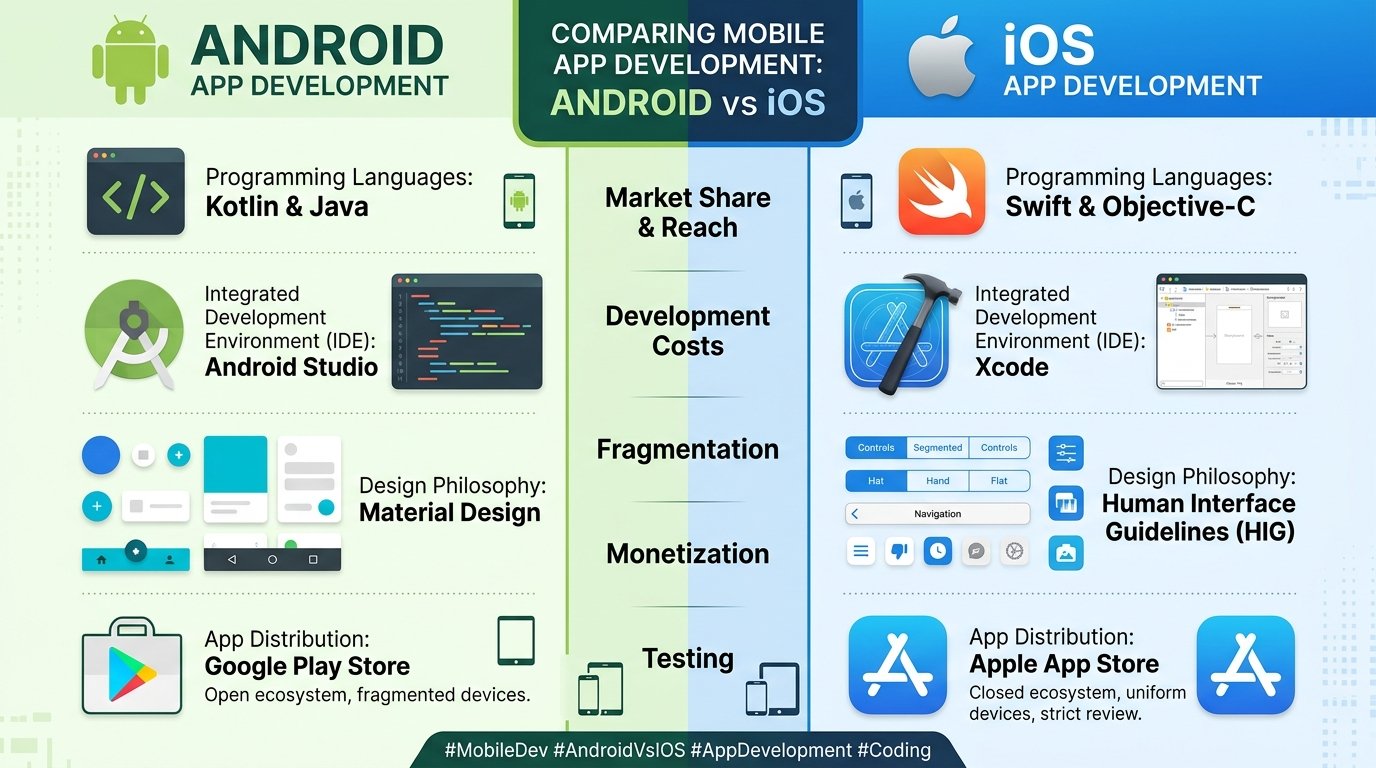
Every mobile app project starts with the same fundamental question: should we build for Android, iOS, or both? The answer shapes everything that follows, from the programming language your team writes in, to the budget you allocate, to the audience you ultimately reach.
Android vs iOS development is not just a technical decision. It is a business decision that affects your revenue model, your go-to-market timeline, and the long-term maintenance cost of your product. Getting it right early saves months of rework later.
This guide walks through the real differences between the two platforms as they stand in 2026, covering languages, tools, market dynamics, development costs, and practical scenarios to help you make the right call.
How Android and iOS Development Actually Differ
At the surface level, Android and iOS development look similar. Both involve writing code, designing interfaces, testing on devices, and publishing to a store. But underneath that similarity, the two platforms diverge in philosophy, tooling, and constraints.
iOS development is built around control. Apple designs the hardware, the operating system, and the development tools. That tight integration creates a predictable environment where developers know exactly which screen sizes, chip architectures, and OS versions they are targeting. The tradeoff is less flexibility and stricter rules about what your app can and cannot do.
Android development is built around openness. Google provides the operating system, but dozens of manufacturers build the hardware. That openness creates a massive global user base and gives developers more freedom, but it also means dealing with thousands of screen sizes, hardware configurations, and OS versions that do not always behave consistently.
Understanding this philosophical difference helps explain almost every practical comparison that follows.
Programming Languages: Kotlin and Swift Lead the Way
The languages you use to build Android and iOS apps have evolved significantly over the past decade, and 2026 reflects that shift clearly.
For iOS, Swift is the dominant language for new projects. Apple introduced Swift in 2014 as a modern replacement for Objective-C, and it has matured into a fast, safe, and expressive language that most iOS developers now prefer. Objective-C still exists in older codebases, but new projects almost universally start with Swift.
If you are evaluating iOS-specific language choices in more detail, our comparison of Swift vs Dart for iOS development covers where each language fits depending on whether you are building natively or using a cross-platform framework.
For Android, Kotlin has taken the lead. Google officially endorsed Kotlin as the preferred language for Android development in 2019, and adoption has grown steadily since. Kotlin offers concise syntax, null safety, and full interoperability with Java, which still powers a significant portion of existing Android apps.
Developers who come from a backend background often find the Android transition easier because of Kotlin’s similarity to modern server-side languages. If your team has experience with Java specifically, our Java vs Python comparison explains how those backend skills translate across different project types.
Development Tools and Environments
Both platforms have mature, well-supported development environments, but they work quite differently.
Xcode is Apple’s integrated development environment for iOS. It handles everything from code editing and interface design to debugging, profiling, and app submission. Xcode runs exclusively on macOS, which means your development team needs Mac hardware. That is a real cost consideration, especially for teams that currently work on Windows or Linux machines.
Android Studio is Google’s official IDE for Android development. Built on IntelliJ IDEA, it provides a powerful code editor, visual layout tools, an emulator for testing, and deep integration with the Android SDK. Android Studio runs on macOS, Windows, and Linux, giving teams more flexibility in their hardware choices.
For developers getting started with cross-platform tooling, our guide on how to run a Flutter app on an Android emulator walks through the practical setup process step by step.
Market Share and Audience Reach
The global market split between Android and iOS has remained relatively stable, but the numbers tell an important story about where your users actually are.
Android holds approximately 72 percent of the global smartphone market. That dominance is driven by affordability and availability. Android devices span every price point, from budget phones under $100 to flagship devices over $1,500. In regions like South Asia, Africa, Southeast Asia, and South America, Android’s market share often exceeds 85 percent.
iOS holds approximately 27 percent of the global market, but that number is misleading in isolation. In countries like Australia, the United States, the United Kingdom, Japan, and Canada, iOS market share is significantly higher, often approaching or exceeding 50 percent. More importantly, iOS users tend to have higher average incomes and spend more on apps and in-app purchases.
The practical takeaway is straightforward. If you are targeting a global audience across emerging markets, Android gives you the broadest reach. If you are targeting affluent consumers in Western markets, particularly in Australia, iOS often delivers stronger revenue per user.
For a broader perspective on which types of apps are gaining traction across both platforms, our overview of app categories that will dominate 2026 and beyond covers the trends shaping mobile right now.
Development Cost: What to Realistically Expect
Cost is one of the most common deciding factors, and the reality is more nuanced than most online estimates suggest.
Android development costs typically range from $5,000 for a simple app with basic features to $200,000 or more for complex, feature-rich applications. The wider cost range reflects the fragmentation challenge. Testing across dozens of devices, screen sizes, and OS versions adds time and therefore cost. Android projects also tend to require more QA effort because of hardware diversity.
iOS development costs follow a similar range, starting around $5,000 for straightforward apps and climbing above $200,000 for enterprise-grade products. While the actual coding time can be shorter because of fewer device variations, iOS development requires Mac hardware, and Apple’s $99 annual developer program fee adds to overhead. Apple’s strict review process can also create unexpected delays that extend project timelines.
For teams weighing whether to build a dedicated mobile app at all versus investing in a web-based solution, our guide on web development vs app development explores how to make that decision based on your specific business needs.
Security: Different Approaches, Different Strengths

Security is a growing concern for any mobile project, and the two platforms handle it differently.
Apple’s closed ecosystem gives iOS a natural security advantage. Apps can only be installed through the App Store, which Apple reviews manually. The operating system restricts inter-app communication and limits what apps can access on the device. These constraints frustrate some developers but create a more predictable security environment for users.
Android’s open-source nature provides more flexibility but also introduces more risk. Apps can be sideloaded from outside the Google Play Store, and the diversity of hardware manufacturers means security patches do not always reach all devices at the same pace. Google has made significant improvements to Android security in recent years, but the platform still requires more active security management from both developers and users.
For teams building apps that handle sensitive data, understanding broader cybersecurity considerations for apps is essential to making sound architectural decisions from the start.
When to Build for Android First
Android makes the most sense as your primary platform when your project aligns with these conditions:
Your target audience is in markets where Android dominates, such as India, Brazil, Indonesia, or sub-Saharan Africa. Your app relies on hardware features or customizations that Android’s open ecosystem supports better. Your budget favours the lower publishing costs and broader device compatibility that Android offers. Your business model depends on ad revenue or freemium conversion rather than premium app purchases, since Android users tend to download more free apps.
Android is also the stronger choice for enterprise tools distributed internally, since sideloading and custom deployment are more straightforward than on iOS.
When to Build for iOS First
iOS is the better starting platform when these factors apply:
Your target audience is in markets with high iOS penetration, particularly Australia, the US, UK, Canada, and Japan. Your revenue model depends on paid downloads or in-app purchases, where iOS users consistently spend more. Your brand requires a polished, premium experience, and Apple’s design standards help ensure consistency. Your team wants a faster initial development cycle with fewer device variations to manage. You are building in a regulated industry where Apple’s security constraints provide a compliance advantage.
Many startups launch on iOS first because the smaller device matrix allows for faster iteration and a more controlled initial rollout.
The Cross-Platform Option: Build Once, Deploy Everywhere
The Android vs iOS debate has a third answer that works for many teams: cross-platform development.
Frameworks like Flutter and React Native allow developers to write a single codebase that compiles into native apps for both Android and iOS. This approach reduces development time, lowers maintenance costs, and lets smaller teams reach both audiences without building two separate apps.
The tradeoff is that cross-platform apps sometimes sacrifice performance or platform-specific polish compared to fully native builds. But for many business applications, content apps, and utility tools, the difference is negligible.
Our detailed comparison of Flutter vs React Native breaks down which cross-platform framework fits different project types. And for teams still deciding between building natively or going cross-platform, our guide on native vs hybrid apps covers the architectural tradeoffs clearly.
What Skills Does Your Team Need?
The platform you choose also determines what skills your developers need.
iOS development requires proficiency in Swift, familiarity with Xcode, understanding of Apple’s Human Interface Guidelines, and experience with Apple’s APIs for things like push notifications, in-app purchases, and HealthKit or ARKit if your app uses those frameworks.
Android development requires Kotlin or Java knowledge, comfort with Android Studio, understanding of Material Design principles, and experience navigating the fragmentation challenges that come with supporting a wide range of devices.
Our comprehensive guide on skills needed for mobile app developers covers the full technical and soft skill requirements for both platforms.
Thinking About Retention After Launch
Choosing the right platform and building a great app is only half the story. What happens after launch matters just as much. User retention rates in mobile are notoriously low, with many apps losing the majority of their users within the first month.
The platform you build on can influence retention through performance, notification capabilities, and integration with device features. But retention ultimately depends on how well your app serves a real need and keeps users coming back.
If your project involves media or content delivery, our guide on user retention in streaming apps covers proven strategies that apply broadly across mobile products.
Modernizing an Existing Mobile App
Not every project starts from scratch. Many businesses already have a mobile app that was built years ago on older technology and now needs updating.
If your existing app was built on an older version of Java for Android or Objective-C for iOS, modernizing it might involve migrating to Kotlin or Swift, adopting a cross-platform framework, or redesigning the architecture for better performance and maintainability.
Our guide on software product modernization covers how to approach legacy upgrades without disrupting your existing user base.
Quick Comparison Summary
Market share: Android leads globally at 72 percent. iOS leads in revenue per user and dominates in Australia, the US, and UK.
Languages: Android uses Kotlin and Java. iOS uses Swift and Objective-C.
Development tools: Android Studio runs on any OS. Xcode requires macOS.
Cost range: Both start around $5,000 for simple apps and scale to $200,000+ for complex builds.
Security: iOS benefits from a closed ecosystem. Android offers flexibility but requires more active security management.
Revenue model: iOS users spend more on premium apps. Android excels for ad-supported and freemium models.
Time to market: iOS is generally faster for initial builds due to fewer device variations.
Cross-platform option: Flutter and React Native let teams build for both platforms from a single codebase.
Final Thoughts
The choice between Android and iOS development is not about which platform is objectively better. It is about which platform aligns with your audience, your budget, your timeline, and your long-term business strategy.
If your users are in Australia or similar high-iOS-adoption markets and your model depends on premium purchases, iOS gives you the strongest foundation to start with. If you need maximum global reach at a lower cost, Android is the clear path. And if you want both without doubling your development effort, cross-platform frameworks offer a practical middle ground that continues to improve every year.
The smartest teams make this decision based on data, not assumptions. Know where your users are, understand how they pay, and choose accordingly.
If you need help deciding which platform fits your project or want to explore cross-platform options, our mobile app development services team builds across Android, iOS, Flutter, and React Native depending on what each project actually requires.
Frequently Asked Questions
Is Android or iOS development easier to learn? iOS development with Swift is often considered slightly easier for beginners because there are fewer device configurations to worry about. Android development with Kotlin is also beginner-friendly but requires more testing across different screen sizes and OS versions.
Which platform makes more money for app developers? iOS apps generally earn more per user through paid downloads and in-app purchases. Android apps generate more revenue through advertising and reach a larger total audience. The best revenue platform depends on your specific business model.
Can I build one app for both Android and iOS? Yes. Cross-platform frameworks like Flutter and React Native let you write a single codebase that deploys to both platforms. This approach works well for most business and utility apps, though performance-intensive apps like games may still benefit from native builds.
How long does it take to develop a mobile app? A simple app typically takes two to four months. A medium-complexity app takes four to eight months. Complex enterprise apps or apps with heavy backend integration can take six to twelve months or longer. iOS apps often have slightly shorter timelines due to fewer device variations.
Should I launch on one platform first or both simultaneously? Launching on one platform first reduces initial cost and lets you validate your product before expanding. Most startups choose iOS first for revenue testing or Android first for scale testing, then expand to the second platform after proving the concept.